
How to Set Up a Local MCP Server
Contents
- Introduction
- What is MCP?
- Requirements
- Step 1: Install LM Studio
- Step 2: Download a Model
- Step 3: Enable Server Mode
- Step 4: Install Open WebUI
- Step 5: Connect Open WebUI to LM Studio
- Step 6: Install mcpo
- Step 7: Create MCP Servers
- Step 8: Configure PowerShell
- Step 9: Connect to Open WebUI
- Testing Your Setup
- Troubleshooting
A beginner-friendly guide to running a local AI model with file access on your own computer
Introduction
This guide will walk you through setting up a local MCP (Model Context Protocol) server that allows your AI to interact with files on your computer. By the end, you'll have a tool-augmented AI assistant that can read, write, search files, and monitor your system when you ask - all running privately on your machine with no cloud services required.
(Note: MCP can also power autonomous agents triggered by hooks, but those require different frameworks beyond this guide's scope.)
- Local AI model running on your computer
- File system tools (read, write, search files)
- System monitoring tools (CPU, RAM, processes)
- Easy PowerShell commands to manage everything
What is MCP?
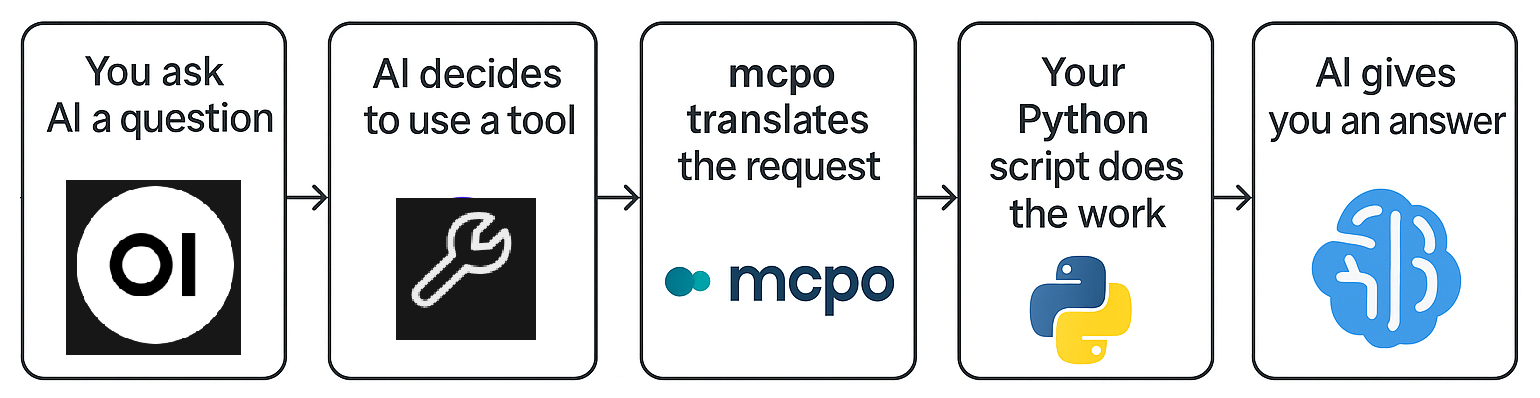
MCP (Model Context Protocol) is essentially a wrapper for APIs that allows AI models to use tools. Think of it like this:
- Without MCP: Your AI can only chat - it can't interact with your computer
- With MCP: Your AI can read files, search documents, check system stats, and more
In this setup:
- You create Python scripts that define what tools the AI can use (like "read this file")
- mcpo (a translator) converts those Python scripts into an API that your AI can call
- Your AI decides when to use these tools to help answer your questions
Requirements
Hardware
Your GPU determines which AI models you can run. Here's a quick reference:
| GPU VRAM | Recommended Model Size | Example GPUs |
|---|---|---|
| 4-6 GB | 3B models | GTX 1060, RTX 3050 |
| 8-12 GB | 7-8B models | RTX 3060, RTX 4060, RTX 4070 |
| 16-24 GB | 13-20B models | RTX 4080, RTX 4090 |
| 24+ GB | 30B+ models | RTX 4090, Professional GPUs |
Software Prerequisites
- Windows 10/11
- Python 3.8 or higher (Download Python)
- PowerShell (comes with Windows)
- An NVIDIA GPU with updated drivers (for best performance)
Step 1: Install LM Studio
LM Studio is a desktop app for running AI models locally on your computer.
- Download LM Studio from lmstudio.ai
- Install and open the application
- You'll see a welcome screen - we'll download a model in the next step
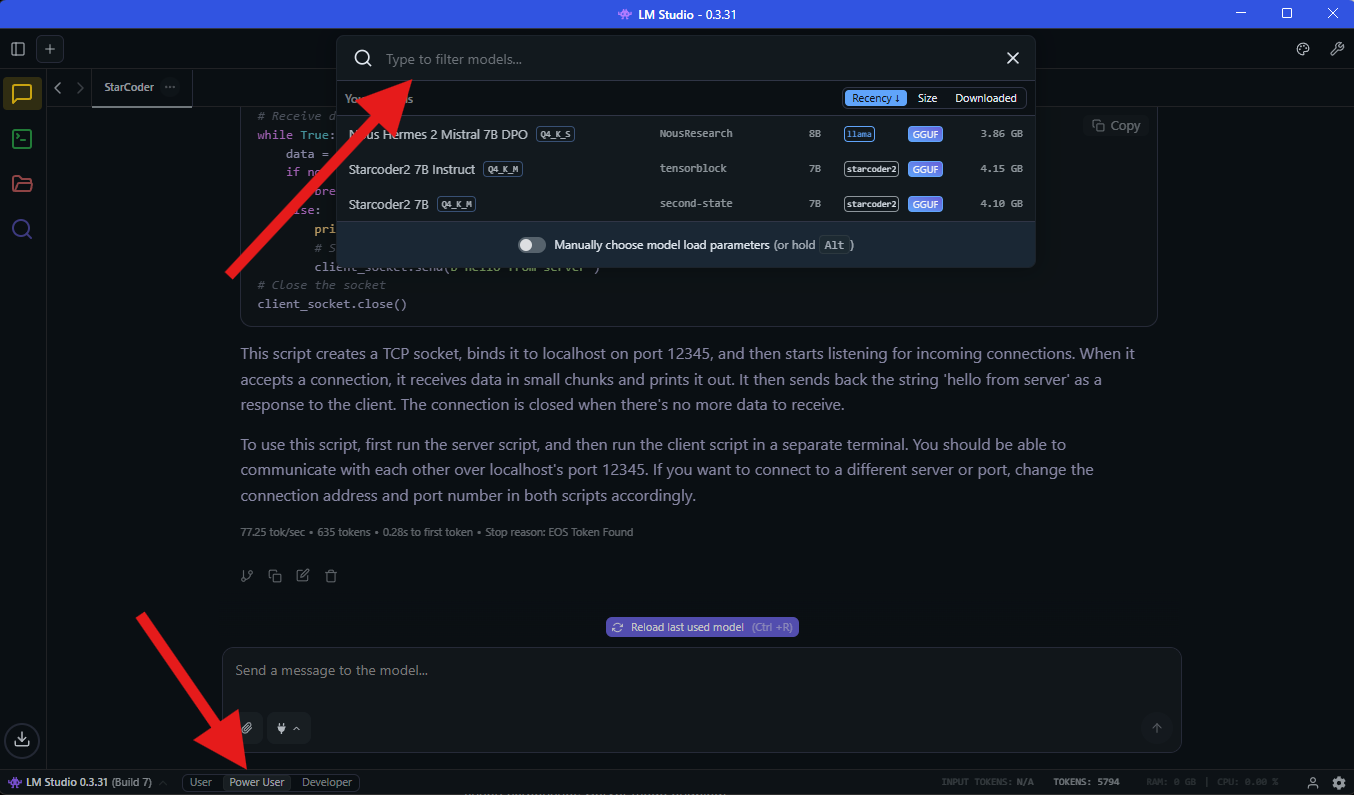
N.B. Select "Power User" at the bottom as shown in the screenshot below, as we will need the extra features it enables later, such as the Developer tab for "Server Mode"
N.B.B Use the search bar at the top to search for models, if it says 'No matching results', then select 'Search more results'
Step 2: Download a Model
We'll download an uncensored model for more flexible conversations. Uncensored models don't have content filters, making them better for creative writing, technical discussions, or any topic without arbitrary restrictions.
Why Nous Hermes 2 Mistral?
- 7 billion parameters - runs well on most GPUs
- Uncensored - no content filtering
- Good at following instructions and using tools
- Not available on Ollama (LM Studio exclusive)
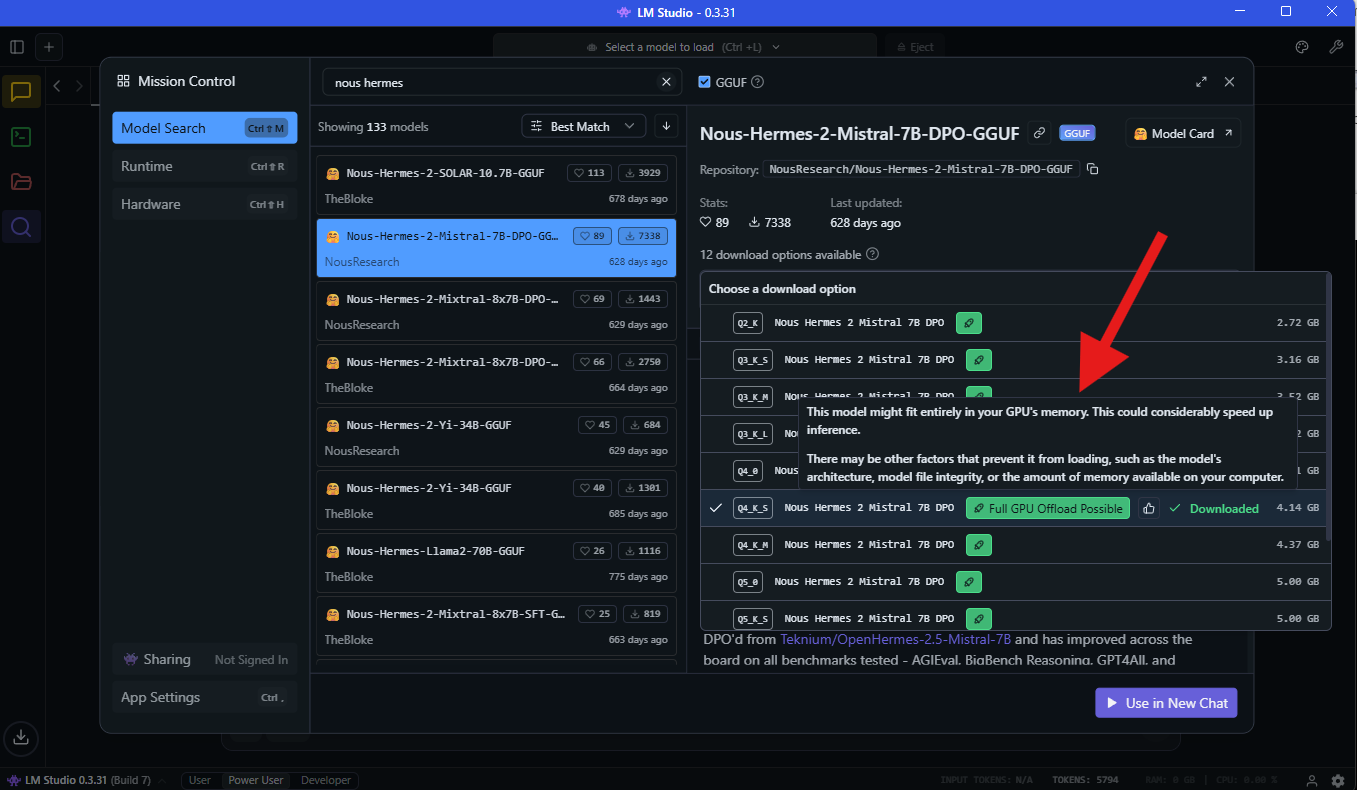
- In LM Studio, click the Search icon (🔍)
- Search for:
nous-hermes-2-mistral - Find NousResearch/Nous-Hermes-2-Mistral-7B-DPO
- Download the
Q4_K_Mquantization (good balance of quality and speed) - Wait for the download to complete (several GB)
N.B. Notice in the screenshot below that LM Studio tags models your computer can run with a green icon saying "Full GPU Offload Possible"
starcoder2 or deepseek-coder.
Step 3: Enable Server Mode
Server mode allows other applications (like Open WebUI) to send requests to your AI model via API.
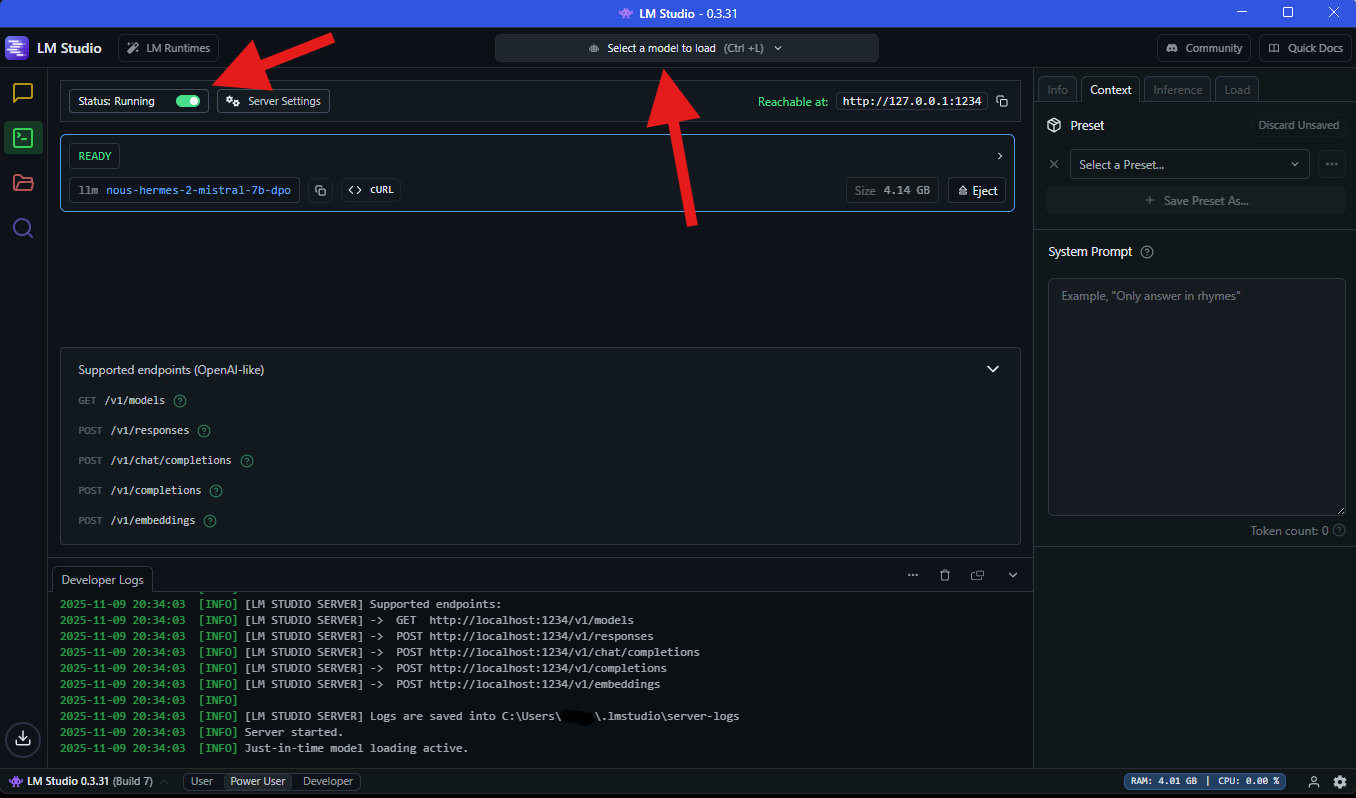
- In LM Studio, click the Developer tab on the left (2nd tab)
- Select your downloaded model from the dropdown
- Click the toggle next to Status: Stopped
- You should see:
Server started on http://localhost:1234
Step 4: Install Open WebUI
Open WebUI is a ChatGPT-like interface that connects to your local model and supports MCP tools.
Installation
Open PowerShell and run:
pip install open-webuiStart Open WebUI
open-webui serveYou should see output like:
INFO: Uvicorn running on http://127.0.0.1:8080Access the Interface
- Open your web browser
- Go to:
http://localhost:8080 - Create an account (stored locally - no internet connection needed)
- You'll see a ChatGPT-like interface
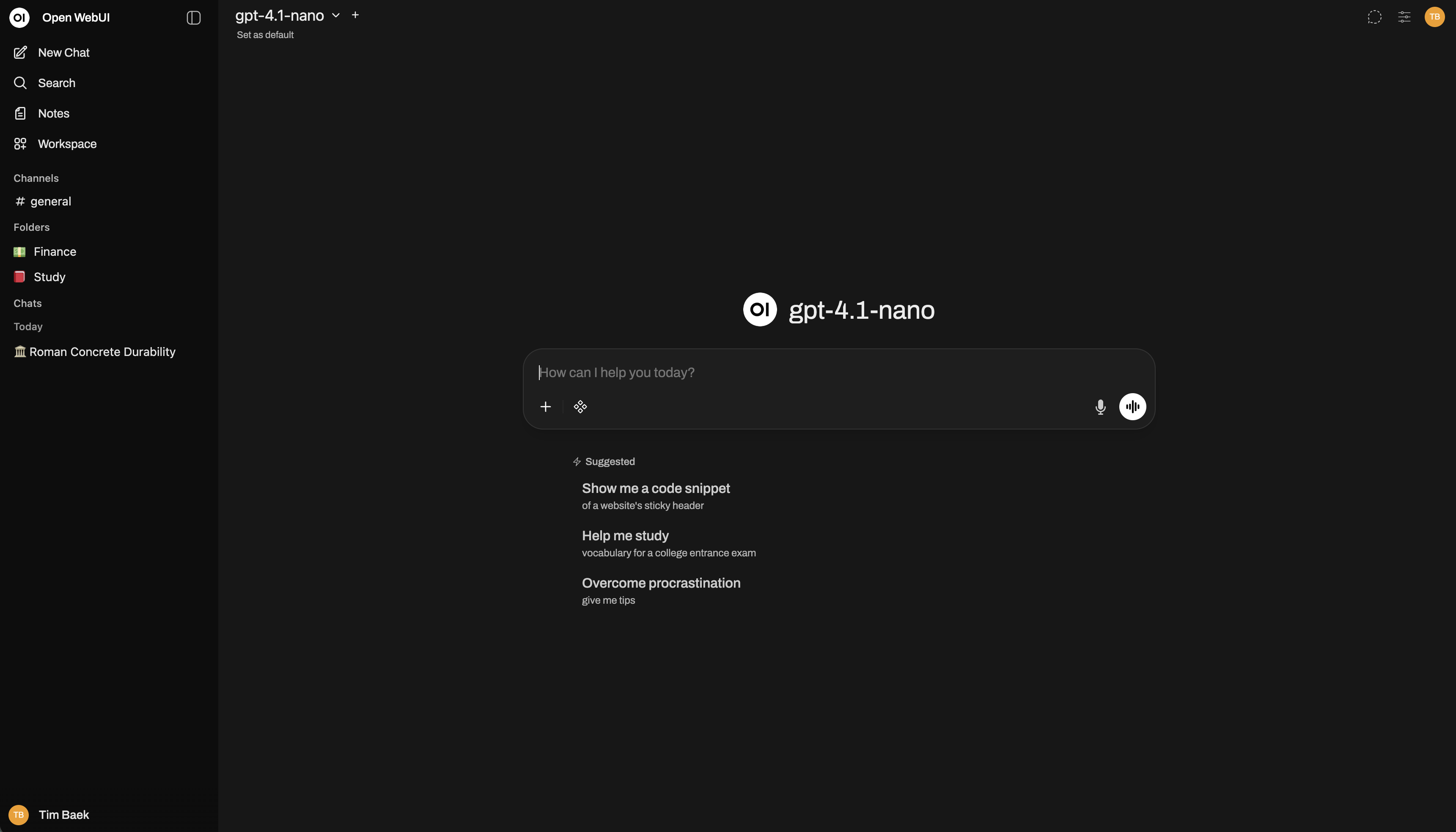
Step 5: Connect Open WebUI to LM Studio
Before we can use our local model, we need to connect OpenWebUI to LM Studio's API server.
Add LM Studio Connection
- Open Open WebUI in your browser (
http://localhost:8080) - Click your profile icon → Admin Panel
- Go to Settings → Connections
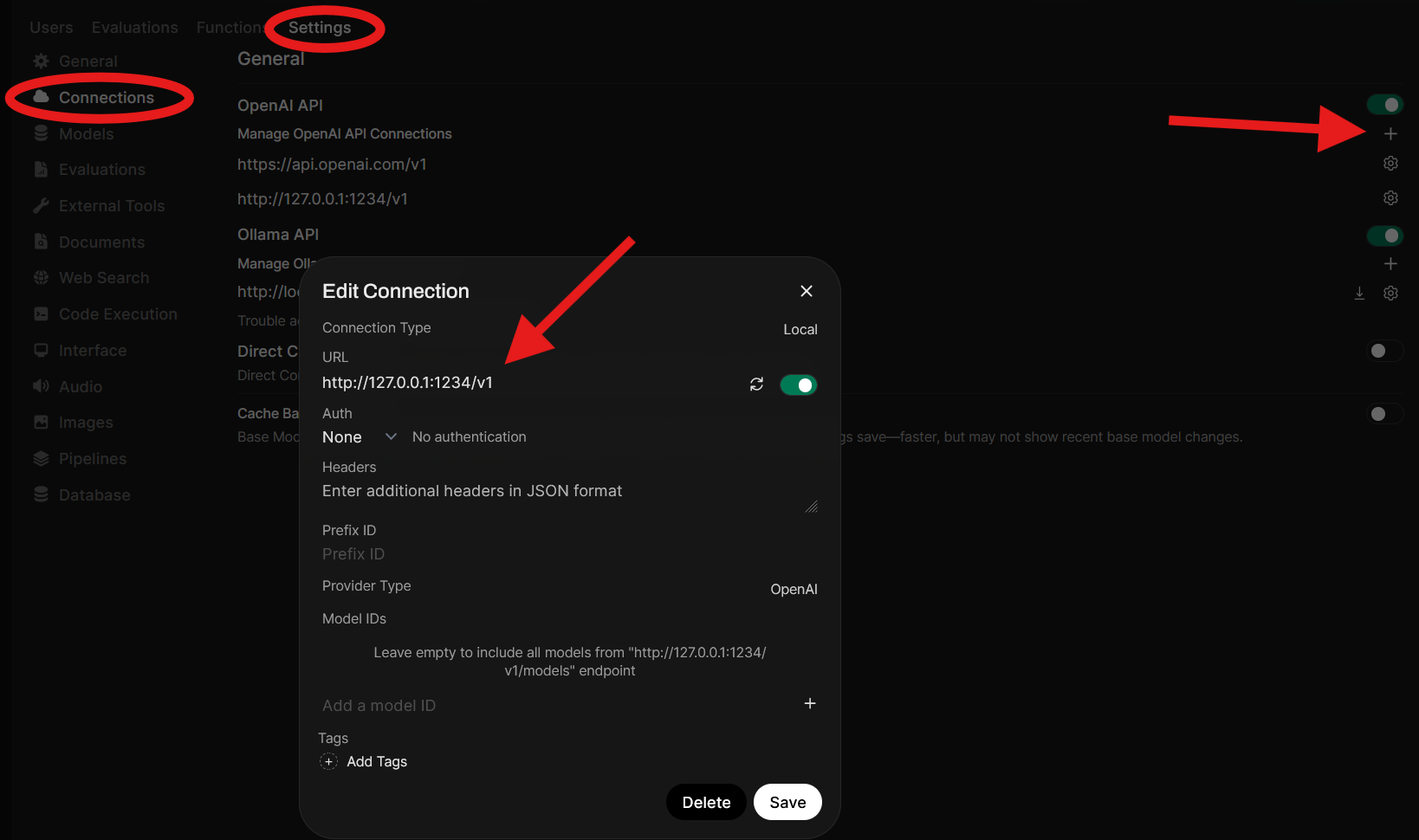
- Under OpenAI API, click the + button
- In the Edit Connection dialog, fill in:
- Connection Type: Local
- URL:
http://127.0.0.1:1234/v1 - Auth: None (no authentication needed for local connection)
- Provider Type: OpenAI
- Click Save

Verify the Connection
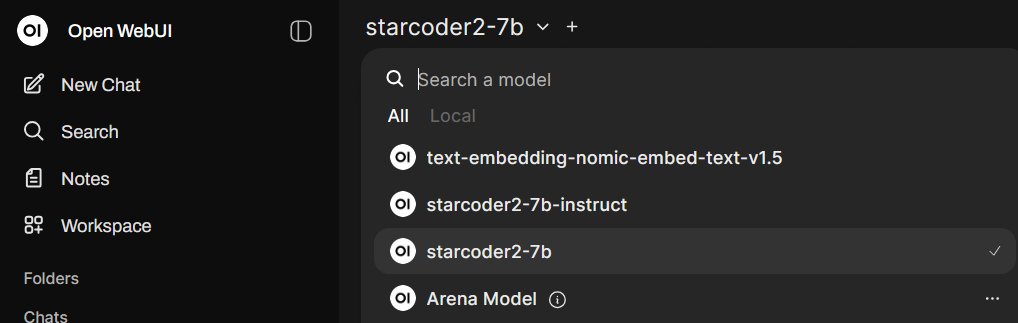
Once saved, your LM Studio models should appear in Open WebUI's model selector dropdown. You'll now be able to chat with your locally-running model through the Open WebUI interface.
Step 6: Install mcpo
mcpo is the translator that bridges MCP servers and Open WebUI. It's officially recommended by Open WebUI.
The Python scripts we will be working with use the MCP protocol (communicating via stdin/stdout), but Open WebUI expects HTTP APIs. mcpo converts between these two, creating a local web server at localhost:8765 that Open WebUI can talk to.
What mcpo Does
- Takes your Python MCP server as input
- Translates MCP protocol messages into HTTP API endpoints
- Creates a web server that Open WebUI can connect to
- Auto-generates documentation at
/docs
Read more: Open WebUI's MCP Documentation
Installation
pip install mcpoThat's it! We'll use mcpo in the next steps to run your MCP servers.
Step 7: Create Your MCP Servers
Now we'll create two Python scripts that define what tools your AI can use.
Setup
First, create a folder to store your MCP servers:
mkdir C:\Users\YourUsername\MCPServersFilesystem MCP (filesystem_mcp.py)
This server gives your AI the ability to read, write, and search files.
Create a new file: C:\Users\YourUsername\MCPServers\filesystem_mcp.py
import os
import logging
from mcp.server import Server
from mcp.server.stdio import stdio_server
from mcp.types import Tool, TextContent
# Setup logging so you can see what's happening
logging.basicConfig(
level=logging.INFO,
format='%(asctime)s - %(name)s - %(levelname)s - %(message)s'
)
logger = logging.getLogger("filesystem-mcp")
# === SECURITY: Define allowed directories ===
# Only these paths (and their subdirectories) can be accessed
ALLOWED_PATHS = [
r"C:\Users", # CHANGE THIS DIRECTORY TO WHERE YOU WANT YOUR MODEL TO ACCESS
]
def is_safe_path(path):
"""Check if the requested path is within allowed directories"""
try:
abs_path = os.path.abspath(path)
for allowed in ALLOWED_PATHS:
if abs_path.startswith(os.path.abspath(allowed)):
return True
return False
except Exception as e:
logger.error(f"Error checking path safety: {e}")
return False
# Create MCP server
app = Server("filesystem-mcp")
@app.list_tools()
async def list_tools() -> list[Tool]:
"""Tell the AI what tools are available"""
logger.info("AI requested tool list")
return [
Tool(
name="read_file",
description="Read the complete contents of a text file. Only works for files in allowed directories.",
inputSchema={
"type": "object",
"properties": {
"path": {
"type": "string",
"description": "Full path to the file to read (e.g., C:\\Users\\YourUsername\\Documents\\notes.txt)"
}
},
"required": ["path"]
}
),
Tool(
name="write_file",
description="Write or overwrite a text file with new content. Creates the file if it doesn't exist.",
inputSchema={
"type": "object",
"properties": {
"path": {
"type": "string",
"description": "Full path where the file should be written"
},
"content": {
"type": "string",
"description": "The text content to write to the file"
}
},
"required": ["path", "content"]
}
),
Tool(
name="list_directory",
description="List all files and folders in a directory. Shows file names only, not contents.",
inputSchema={
"type": "object",
"properties": {
"path": {
"type": "string",
"description": "Full path to the directory to list"
}
},
"required": ["path"]
}
),
Tool(
name="search_files",
description="Search for files by name pattern in a directory (recursive). Case-insensitive.",
inputSchema={
"type": "object",
"properties": {
"directory": {
"type": "string",
"description": "Directory to search in"
},
"pattern": {
"type": "string",
"description": "File name pattern to search for (e.g., '*.txt' or 'meeting')"
}
},
"required": ["directory", "pattern"]
}
),
Tool(
name="search_file_contents",
description="Search for text INSIDE files (not just filenames). Returns matching lines with context. Useful for finding specific text, code, or notes across multiple files.",
inputSchema={
"type": "object",
"properties": {
"directory": {
"type": "string",
"description": "Directory to search in (searches recursively)"
},
"search_text": {
"type": "string",
"description": "Text to search for inside files"
},
"file_extensions": {
"type": "array",
"items": {"type": "string"},
"description": "Optional: specific file extensions to search (e.g., ['.txt', '.py']). Defaults to common text files."
}
},
"required": ["directory", "search_text"]
}
),
Tool(
name="find_and_replace_file",
description="Find the FIRST file containing specific text, then replace its ENTIRE contents with new text. This is a combined search + replace operation in one step.",
inputSchema={
"type": "object",
"properties": {
"directory": {
"type": "string",
"description": "Directory to search in"
},
"search_text": {
"type": "string",
"description": "Text to search for inside files (will find first file containing this)"
},
"new_content": {
"type": "string",
"description": "New content to replace the ENTIRE file contents with"
}
},
"required": ["directory", "search_text", "new_content"]
}
)
]
@app.call_tool()
async def call_tool(name: str, arguments: dict) -> list[TextContent]:
"""Handle tool calls from the AI"""
logger.info(f"Tool called: {name} with arguments: {arguments}")
if name == "read_file":
path = arguments["path"]
if not is_safe_path(path):
error_msg = f"❌ Access denied: {path}\nOnly allowed directories: {', '.join(ALLOWED_PATHS)}"
logger.warning(f"Blocked read attempt: {path}")
return [TextContent(type="text", text=error_msg)]
try:
with open(path, 'r', encoding='utf-8') as f:
content = f.read()
logger.info(f"✅ Successfully read {len(content)} chars from {path}")
return [TextContent(type="text", text=content)]
except FileNotFoundError:
return [TextContent(type="text", text=f"❌ File not found: {path}")]
except Exception as e:
logger.error(f"Error reading file: {e}")
return [TextContent(type="text", text=f"❌ Error reading file: {str(e)}")]
elif name == "write_file":
path = arguments["path"]
content = arguments["content"]
if not is_safe_path(path):
error_msg = f"❌ Access denied: {path}\nOnly allowed directories: {', '.join(ALLOWED_PATHS)}"
logger.warning(f"Blocked write attempt: {path}")
return [TextContent(type="text", text=error_msg)]
try:
os.makedirs(os.path.dirname(path), exist_ok=True)
with open(path, 'w', encoding='utf-8') as f:
f.write(content)
logger.info(f"✅ Successfully wrote {len(content)} chars to {path}")
return [TextContent(type="text", text=f"✅ Successfully wrote to {path} ({len(content)} characters)")]
except Exception as e:
logger.error(f"Error writing file: {e}")
return [TextContent(type="text", text=f"❌ Error writing file: {str(e)}")]
elif name == "list_directory":
path = arguments["path"]
if not is_safe_path(path):
error_msg = f"❌ Access denied: {path}\nOnly allowed directories: {', '.join(ALLOWED_PATHS)}"
logger.warning(f"Blocked list attempt: {path}")
return [TextContent(type="text", text=error_msg)]
try:
items = os.listdir(path)
files = []
dirs = []
for item in items:
full_path = os.path.join(path, item)
if os.path.isdir(full_path):
dirs.append(f"📁 {item}")
else:
size = os.path.getsize(full_path)
size_str = f"{size:,} bytes" if size < 1024 else f"{size/1024:.1f} KB"
files.append(f"📄 {item} ({size_str})")
result = f"Contents of {path}:\n\n"
if dirs:
result += "Directories:\n" + "\n".join(sorted(dirs)) + "\n\n"
if files:
result += "Files:\n" + "\n".join(sorted(files))
if not dirs and not files:
result += "(empty directory)"
logger.info(f"✅ Listed {len(dirs)} dirs and {len(files)} files in {path}")
return [TextContent(type="text", text=result)]
except FileNotFoundError:
return [TextContent(type="text", text=f"❌ Directory not found: {path}")]
except Exception as e:
logger.error(f"Error listing directory: {e}")
return [TextContent(type="text", text=f"❌ Error listing directory: {str(e)}")]
elif name == "search_files":
directory = arguments["directory"]
pattern = arguments["pattern"].lower()
if not is_safe_path(directory):
error_msg = f"❌ Access denied: {directory}\nOnly allowed directories: {', '.join(ALLOWED_PATHS)}"
logger.warning(f"Blocked search attempt: {directory}")
return [TextContent(type="text", text=error_msg)]
try:
matches = []
for root, dirs, files in os.walk(directory):
if not is_safe_path(root):
continue
for file in files:
if pattern in file.lower():
full_path = os.path.join(root, file)
rel_path = os.path.relpath(full_path, directory)
matches.append(rel_path)
if matches:
result = f"Found {len(matches)} file(s) matching '{pattern}':\n\n"
result += "\n".join(f"📄 {match}" for match in sorted(matches))
else:
result = f"No files found matching '{pattern}' in {directory}"
logger.info(f"✅ Search completed: {len(matches)} matches for '{pattern}'")
return [TextContent(type="text", text=result)]
except Exception as e:
logger.error(f"Error searching files: {e}")
return [TextContent(type="text", text=f"❌ Error searching: {str(e)}")]
elif name == "search_file_contents":
directory = arguments["directory"]
search_text = arguments["search_text"].lower()
file_extensions = arguments.get("file_extensions", [".txt", ".md", ".py", ".js", ".json", ".log", ".csv"])
if not is_safe_path(directory):
error_msg = f"❌ Access denied: {directory}\nOnly allowed directories: {', '.join(ALLOWED_PATHS)}"
logger.warning(f"Blocked content search attempt: {directory}")
return [TextContent(type="text", text=error_msg)]
try:
matches = []
files_searched = 0
for root, dirs, files in os.walk(directory):
if not is_safe_path(root):
continue
for file in files:
file_ext = os.path.splitext(file)[1].lower()
if file_extensions and file_ext not in file_extensions:
continue
full_path = os.path.join(root, file)
files_searched += 1
try:
with open(full_path, 'r', encoding='utf-8', errors='ignore') as f:
lines = f.readlines()
for line_num, line in enumerate(lines, start=1):
if search_text in line.lower():
rel_path = os.path.relpath(full_path, directory)
match_info = {
'file': rel_path,
'line': line_num,
'content': line.strip()
}
matches.append(match_info)
except (UnicodeDecodeError, PermissionError):
continue
if matches:
result = f"Found '{search_text}' in {len(matches)} location(s) across {files_searched} files:\n\n"
files_with_matches = {}
for match in matches:
if match['file'] not in files_with_matches:
files_with_matches[match['file']] = []
files_with_matches[match['file']].append(match)
for file_path, file_matches in files_with_matches.items():
result += f"📄 {file_path}\n"
for match in file_matches[:5]:
result += f" Line {match['line']}: {match['content']}\n"
if len(file_matches) > 5:
result += f" ... and {len(file_matches) - 5} more match(es)\n"
result += "\n"
else:
result = f"No matches found for '{search_text}' in {files_searched} files searched."
logger.info(f"✅ Content search completed: {len(matches)} matches in {files_searched} files")
return [TextContent(type="text", text=result)]
except Exception as e:
logger.error(f"Error searching file contents: {e}")
return [TextContent(type="text", text=f"❌ Error searching: {str(e)}")]
elif name == "find_and_replace_file":
directory = arguments["directory"]
search_text = arguments["search_text"].lower()
new_content = arguments["new_content"]
if not is_safe_path(directory):
error_msg = f"❌ Access denied: {directory}\nOnly allowed directories: {', '.join(ALLOWED_PATHS)}"
logger.warning(f"Blocked find_and_replace attempt: {directory}")
return [TextContent(type="text", text=error_msg)]
try:
# Search for the first file containing the text
found_file = None
file_extensions = [".txt", ".md", ".py", ".js", ".json", ".log", ".csv"]
for root, dirs, files in os.walk(directory):
if not is_safe_path(root):
continue
for file in files:
file_ext = os.path.splitext(file)[1].lower()
if file_ext not in file_extensions:
continue
full_path = os.path.join(root, file)
try:
with open(full_path, 'r', encoding='utf-8', errors='ignore') as f:
content = f.read()
if search_text in content.lower():
found_file = full_path
break
except (UnicodeDecodeError, PermissionError):
continue
if found_file:
break
if not found_file:
return [TextContent(type="text", text=f"❌ No file found containing '{search_text}' in {directory}")]
# Now replace the file contents
try:
with open(found_file, 'w', encoding='utf-8') as f:
f.write(new_content)
rel_path = os.path.relpath(found_file, directory)
logger.info(f"✅ Found and replaced contents of {found_file}")
return [TextContent(type="text", text=f"✅ Found file '{rel_path}' containing '{search_text}' and replaced its contents with new text ({len(new_content)} characters)")]
except Exception as e:
logger.error(f"Error writing to file: {e}")
return [TextContent(type="text", text=f"❌ Found file but failed to write: {str(e)}")]
except Exception as e:
logger.error(f"Error in find_and_replace: {e}")
return [TextContent(type="text", text=f"❌ Error: {str(e)}")]
return [TextContent(type="text", text=f"❌ Unknown tool: {name}")]
if __name__ == "__main__":
logger.info("=== MCP Filesystem Server Starting ===")
logger.info(f"Allowed directories: {ALLOWED_PATHS}")
logger.info("Press Ctrl+C to stop")
try:
import asyncio
async def main():
async with stdio_server() as (read_stream, write_stream):
await app.run(
read_stream,
write_stream,
app.create_initialization_options()
)
asyncio.run(main())
except KeyboardInterrupt:
logger.info("\n=== Server stopped by user ===")
except Exception as e:
logger.error(f"Server error: {e}")ALLOWED_PATHS at the top of the script to specify which folders the AI can access. Never give it access to system folders or sensitive directories!
System Info MCP (systeminfo_mcp.py)
This server lets your AI check system stats like CPU usage, RAM, disk space, and running processes.
Create a new file: C:\Users\YourUsername\MCPServers\systeminfo_mcp.py
import os
import logging
import psutil
import platform
from datetime import datetime
from mcp.server import Server
from mcp.server.stdio import stdio_server
from mcp.types import Tool, TextContent

logging.basicConfig(level=logging.INFO)
logger = logging.getLogger("system-info-mcp")

# === SECURITY: Define allowed directories for file searches ===
ALLOWED_SEARCH_PATHS = [
    r"C:\Users", # CHANGE THIS DIRECTORY TO WHERE YOU WANT YOUR MODEL TO ACCESS
]

def is_safe_path(path):
    """Check if path is within allowed directories"""
    try:
        abs_path = os.path.abspath(path)
        for allowed in ALLOWED_SEARCH_PATHS:
            if abs_path.startswith(os.path.abspath(allowed)):
                return True
        return False
    except:
        return False

app = Server("system-info-mcp")

@app.list_tools()
async def list_tools() -> list[Tool]:
    return [
        Tool(
            name="get_full_system_report",
            description="Get a comprehensive system report with ALL information: CPU, RAM, disk, battery, network, uptime, top processes. Use this when asked for complete system overview or 'all stats'.",
            inputSchema={"type": "object", "properties": {}}
        ),
        Tool(
            name="get_system_stats",
            description="Get current CPU usage, RAM usage, and disk space. Read-only, safe.",
            inputSchema={"type": "object", "properties": {}}
        ),
        Tool(
            name="list_processes",
            description="List all running processes with their CPU and memory usage. Read-only, safe.",
            inputSchema={
                "type": "object",
                "properties": {
                    "top_n": {
                        "type": "integer",
                        "description": "Show top N processes by CPU usage (default: 10)"
                    }
                }
            }
        ),
        Tool(
            name="get_disk_info",
            description="Get detailed disk space information for all drives. Read-only, safe.",
            inputSchema={"type": "object", "properties": {}}
        ),
        Tool(
            name="get_network_info",
            description="Get current WiFi network name and IP address. Read-only, safe.",
            inputSchema={"type": "object", "properties": {}}
        ),
        Tool(
            name="get_battery_status",
            description="Get battery percentage and charging status (if laptop). Read-only, safe.",
            inputSchema={"type": "object", "properties": {}}
        ),
        Tool(
            name="find_recent_files",
            description="Find recently modified files in allowed directories only. Read-only, safe.",
            inputSchema={
                "type": "object",
                "properties": {
                    "directory": {
                        "type": "string",
                        "description": "Directory to search (must be in allowed paths)"
                    },
                    "hours": {
                        "type": "integer",
                        "description": "Show files modified in last N hours (default: 24)"
                    }
                },
                "required": ["directory"]
            }
        ),
        Tool(
            name="get_system_info",
            description="Get basic system information (OS, hostname, uptime). Read-only, safe.",
            inputSchema={"type": "object", "properties": {}}
        )
    ]

@app.call_tool()
async def call_tool(name: str, arguments: dict) -> list[TextContent]:
    logger.info(f"Tool called: {name}")

    try:
        if name == "get_full_system_report":
            import socket

            # Gather all information
            cpu_percent = psutil.cpu_percent(interval=1)
            memory = psutil.virtual_memory()
            disk = psutil.disk_usage('C:\\')

            boot_time = datetime.fromtimestamp(psutil.boot_time())
            uptime = datetime.now() - boot_time

            hostname = socket.gethostname()
            local_ip = socket.gethostbyname(hostname)

            battery = psutil.sensors_battery()
            if battery:
                charging = "Charging" if battery.power_plugged else "On Battery"
                battery_str = f"\n\nBattery:\n  Status: {charging}\n  Level: {battery.percent}%"
            else:
                battery_str = "\n\nBattery: Desktop (no battery detected)"

            # Top 5 processes
            processes = []
            for proc in psutil.process_iter(['name', 'cpu_percent']):
                try:
                    processes.append({
                        'name': proc.info['name'],
                        'cpu': proc.info['cpu_percent'] or 0
                    })
                except:
                    continue

            processes.sort(key=lambda x: x['cpu'], reverse=True)
            top_procs = "\n".join([f"  {i+1}. {p['name']} - {p['cpu']:.1f}% CPU"
                                   for i, p in enumerate(processes[:5])])

            # Build report
            result = f"""SYSTEM REPORT
=============

Hardware & OS:
  OS: {platform.system()} {platform.release()}
  Hostname: {hostname}
  Processor: {platform.processor()}
  Uptime: {uptime.days} days, {uptime.seconds//3600} hours

Performance:
  CPU Usage: {cpu_percent}%
  RAM Usage: {memory.percent}% ({memory.used / (1024**3):.1f} GB / {memory.total / (1024**3):.1f} GB)
  RAM Available: {memory.available / (1024**3):.1f} GB
  Disk C Usage: {disk.percent}% ({disk.used / (1024**3):.1f} GB used, {disk.free / (1024**3):.1f} GB free)

Network:
  IP Address: {local_ip}{battery_str}

Top 5 Processes (by CPU):
{top_procs}"""

            return [TextContent(type="text", text=result)]

        elif name == "get_system_stats":
            cpu_percent = psutil.cpu_percent(interval=1)
            memory = psutil.virtual_memory()
            disk = psutil.disk_usage('C:\\')

            result = f"""System Statistics:

CPU Usage: {cpu_percent}%
RAM Usage: {memory.percent}% ({memory.used / (1024**3):.1f} GB / {memory.total / (1024**3):.1f} GB)
Disk C Usage: {disk.percent}% ({disk.used / (1024**3):.1f} GB / {disk.total / (1024**3):.1f} GB)
Available RAM: {memory.available / (1024**3):.1f} GB"""

            return [TextContent(type="text", text=result)]

        elif name == "list_processes":
            top_n = arguments.get("top_n", 10)

            # Get all processes
            processes = []
            for proc in psutil.process_iter(['name', 'cpu_percent', 'memory_percent']):
                try:
                    processes.append({
                        'name': proc.info['name'],
                        'cpu': proc.info['cpu_percent'] or 0,
                        'memory': proc.info['memory_percent'] or 0
                    })
                except (psutil.NoSuchProcess, psutil.AccessDenied):
                    continue

            # Sort by CPU usage
            processes.sort(key=lambda x: x['cpu'], reverse=True)
            top_processes = processes[:top_n]

            result = f"Top {top_n} Processes by CPU Usage:\n\n"
            for i, proc in enumerate(top_processes, 1):
                result += f"{i}. {proc['name']}\n"
                result += f"   CPU: {proc['cpu']:.1f}% | RAM: {proc['memory']:.1f}%\n"

            return [TextContent(type="text", text=result)]

        elif name == "get_disk_info":
            result = "Disk Information:\n\n"

            for partition in psutil.disk_partitions():
                try:
                    usage = psutil.disk_usage(partition.mountpoint)
                    result += f"Drive {partition.device} ({partition.fstype})\n"
                    result += f"   Total: {usage.total / (1024**3):.1f} GB\n"
                    result += f"   Used: {usage.used / (1024**3):.1f} GB ({usage.percent}%)\n"
                    result += f"   Free: {usage.free / (1024**3):.1f} GB\n\n"
                except PermissionError:
                    continue

            return [TextContent(type="text", text=result)]

        elif name == "get_network_info":
            import socket

            hostname = socket.gethostname()
            local_ip = socket.gethostbyname(hostname)

            result = f"""Network Information:

Hostname: {hostname}
Local IP: {local_ip}"""

            # Try to get WiFi name (Windows specific)
            try:
                import subprocess
                output = subprocess.check_output(['netsh', 'wlan', 'show', 'interfaces'],
                                                encoding='utf-8', errors='ignore')
                for line in output.split('\n'):
                    if 'SSID' in line and 'BSSID' not in line:
                        wifi_name = line.split(':')[1].strip()
                        result += f"\nWiFi: {wifi_name}"
                        break
            except:
                pass

            return [TextContent(type="text", text=result)]

        elif name == "get_battery_status":
            battery = psutil.sensors_battery()

            if battery is None:
                result = "No battery detected (desktop computer)"
            else:
                charging = "Charging" if battery.power_plugged else "On Battery"
                percent = battery.percent
                time_left = battery.secsleft

                result = f"""Battery Status:

{charging}
Level: {percent}%"""

                if time_left != psutil.POWER_TIME_UNLIMITED and time_left > 0:
                    hours = time_left // 3600
                    minutes = (time_left % 3600) // 60
                    result += f"\nTime Remaining: {hours}h {minutes}m"

            return [TextContent(type="text", text=result)]

        elif name == "find_recent_files":
            directory = arguments["directory"]
            hours = arguments.get("hours", 24)

            # Security check
            if not is_safe_path(directory):
                return [TextContent(type="text",
                    text=f"Access denied: {directory}\nAllowed: {', '.join(ALLOWED_SEARCH_PATHS)}")]

            if not os.path.exists(directory):
                return [TextContent(type="text", text=f"Directory not found: {directory}")]

            # Find recent files
            now = datetime.now()
            cutoff_time = now.timestamp() - (hours * 3600)
            recent_files = []

            for root, dirs, files in os.walk(directory):
                if not is_safe_path(root):
                    continue

                for file in files:
                    full_path = os.path.join(root, file)
                    try:
                        mtime = os.path.getmtime(full_path)
                        if mtime > cutoff_time:
                            rel_path = os.path.relpath(full_path, directory)
                            age_hours = (now.timestamp() - mtime) / 3600
                            size = os.path.getsize(full_path)
                            size_str = f"{size:,} bytes" if size < 1024 else f"{size/1024:.1f} KB"

                            recent_files.append({
                                'path': rel_path,
                                'age_hours': age_hours,
                                'size': size_str
                            })
                    except:
                        continue

            # Sort by most recent
            recent_files.sort(key=lambda x: x['age_hours'])

            if recent_files:
                result = f"Files modified in last {hours} hours:\n\n"
                for f in recent_files[:20]:
                    age = f"{f['age_hours']:.1f}h ago" if f['age_hours'] >= 1 else f"{f['age_hours']*60:.0f}m ago"
                    result += f"{f['path']}\n   Modified: {age} | Size: {f['size']}\n"

                if len(recent_files) > 20:
                    result += f"\n... and {len(recent_files) - 20} more files"
            else:
                result = f"No files modified in the last {hours} hours in {directory}"

            return [TextContent(type="text", text=result)]

        elif name == "get_system_info":
            boot_time = datetime.fromtimestamp(psutil.boot_time())
            uptime = datetime.now() - boot_time

            result = f"""System Information:

OS: {platform.system()} {platform.release()}
Hostname: {platform.node()}
Uptime: {uptime.days} days, {uptime.seconds//3600} hours
Processor: {platform.processor()}
Python: {platform.python_version()}"""

            return [TextContent(type="text", text=result)]

        return [TextContent(type="text", text=f"Unknown tool: {name}")]

    except Exception as e:
        logger.error(f"Error in {name}: {e}")
        return [TextContent(type="text", text=f"Error: {str(e)}")]

if __name__ == "__main__":
    logger.info("=== System Info MCP Server Starting ===")
    logger.info("READ-ONLY MODE - Safe system monitoring")
    logger.info("Press Ctrl+C to stop")

    try:
        import asyncio

        async def main():
            async with stdio_server() as (read_stream, write_stream):
                await app.run(read_stream, write_stream, app.create_initialization_options())

        asyncio.run(main())
    except KeyboardInterrupt:
        logger.info("\n=== Server stopped by user ===")
    except Exception as e:
        logger.error(f"Server error: {e}")
Install Required Library
The system info script needs the psutil library:
pip install psutilStep 8: Configure PowerShell Profile
We'll create a convenient command to start your MCP servers with an auto-discovery menu. This command handles starting mcpo automatically, so you don't need to run it manually.
Edit Your PowerShell Profile
notepad $PROFILEIf you get an error saying the file doesn't exist, create it first:
New-Item -Path $PROFILE -Type File -Force
notepad $PROFILE
Add This Function
# === MCP SERVER FUNCTIONS ===

function Start-MCPFileSystem {
    param([int]$Port = 8765)

    $mcpFolder = "C:\Users\YourUsername\MCPServers" # PATH TO FOLDER CONTAINING YOUR MCP PYTHON SCRIPTS

    # Find all Python files in the MCP folder
    $scripts = Get-ChildItem "$mcpFolder\*.py" -ErrorAction SilentlyContinue | Sort-Object Name

    if (-not $scripts) {
        Write-Host "No MCP servers found in $mcpFolder" -ForegroundColor Red
        Write-Host "Create Python MCP scripts in that folder to get started." -ForegroundColor Gray
        return
    }

    # If only one script, use it automatically
    if ($scripts.Count -eq 1) {
        $selectedScript = $scripts[0].FullName
        $serverName = $scripts[0].BaseName
        Write-Host "Auto-selected: $serverName" -ForegroundColor Cyan
    } else {
        # Show menu
        Write-Host "Available MCP Servers:" -ForegroundColor Cyan
        Write-Host ""

        for ($i = 0; $i -lt $scripts.Count; $i++) {
            $name = $scripts[$i].BaseName
            $size = [math]::Round($scripts[$i].Length / 1KB, 1)
            Write-Host "  $($i+1). $name" -NoNewline -ForegroundColor White
            Write-Host " ($size KB)" -ForegroundColor DarkGray
        }

        Write-Host ""
        $choice = Read-Host "Select server (1-$($scripts.Count))"

        # Validate choice
        $choiceNum = 0
        if ([int]::TryParse($choice, [ref]$choiceNum) -and $choiceNum -ge 1 -and $choiceNum -le $scripts.Count) {
            $selectedScript = $scripts[$choiceNum - 1].FullName
            $serverName = $scripts[$choiceNum - 1].BaseName
        } else {
            Write-Host "Invalid selection" -ForegroundColor Red
            return
        }
    }

    # Start the server
    Write-Host ""
    Write-Host "Starting MCP Server: $serverName" -ForegroundColor Green
    Write-Host "Access your files through Open WebUI!" -ForegroundColor Green
    Write-Host "API Docs at localhost:$Port/docs" -ForegroundColor Cyan
    Write-Host "Press Ctrl+C to stop" -ForegroundColor Yellow
    Write-Host ""

    mcpo --port $Port -- python $selectedScript
}

Set-Alias -Name startmcp -Value Start-MCPFileSystem
Reload Your Profile
. $PROFILETest It
startmcpYou should see a menu listing your MCP servers:
Available MCP Servers:

  1. filesystem_mcp (3.2 KB)
  2. systeminfo_mcp (2.8 KB)

Select server (1-2):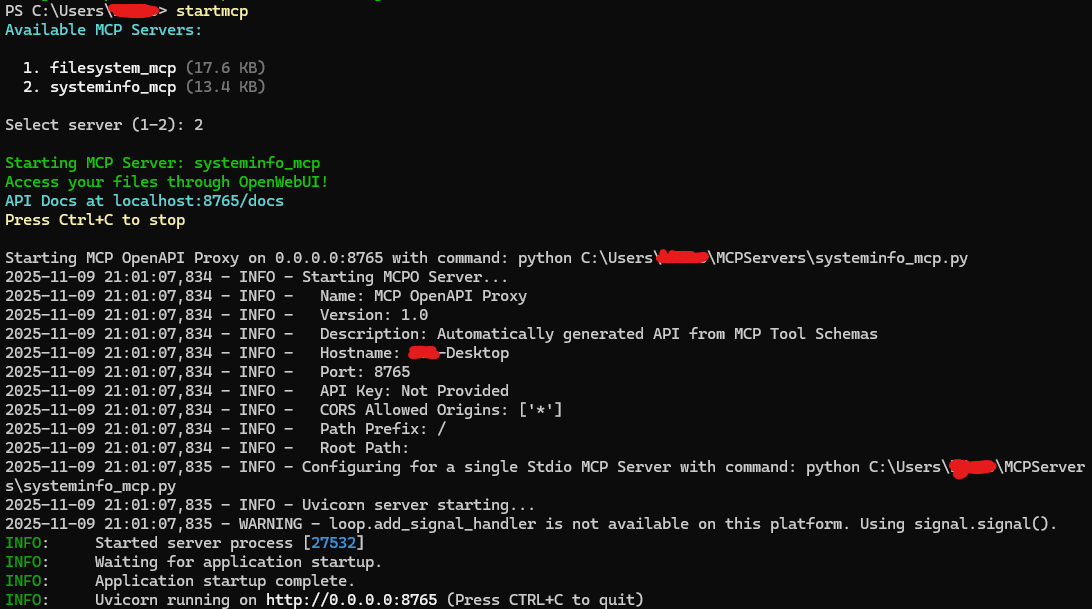
Step 9: Connect Open WebUI to Your MCP Server
Start an MCP Server
- Open PowerShell
- Run:
startmcp - Select
1for filesystem tools (or2for system info) - You'll see:
Starting MCP Server... API Docs at localhost:8765/docs
Connect in Open WebUI
- Open Open WebUI in your browser (
http://localhost:8080) - Click your profile icon → Admin Panel
- Go to Settings → External Tools
- Click + Add Connection
- Fill in:
- Type: OpenAPI
- Name: Local MCP Tools
- URL:
http://localhost:8765/openapi.json - Description: Dynamic tool server - changes based on active MCP server
- Click Save
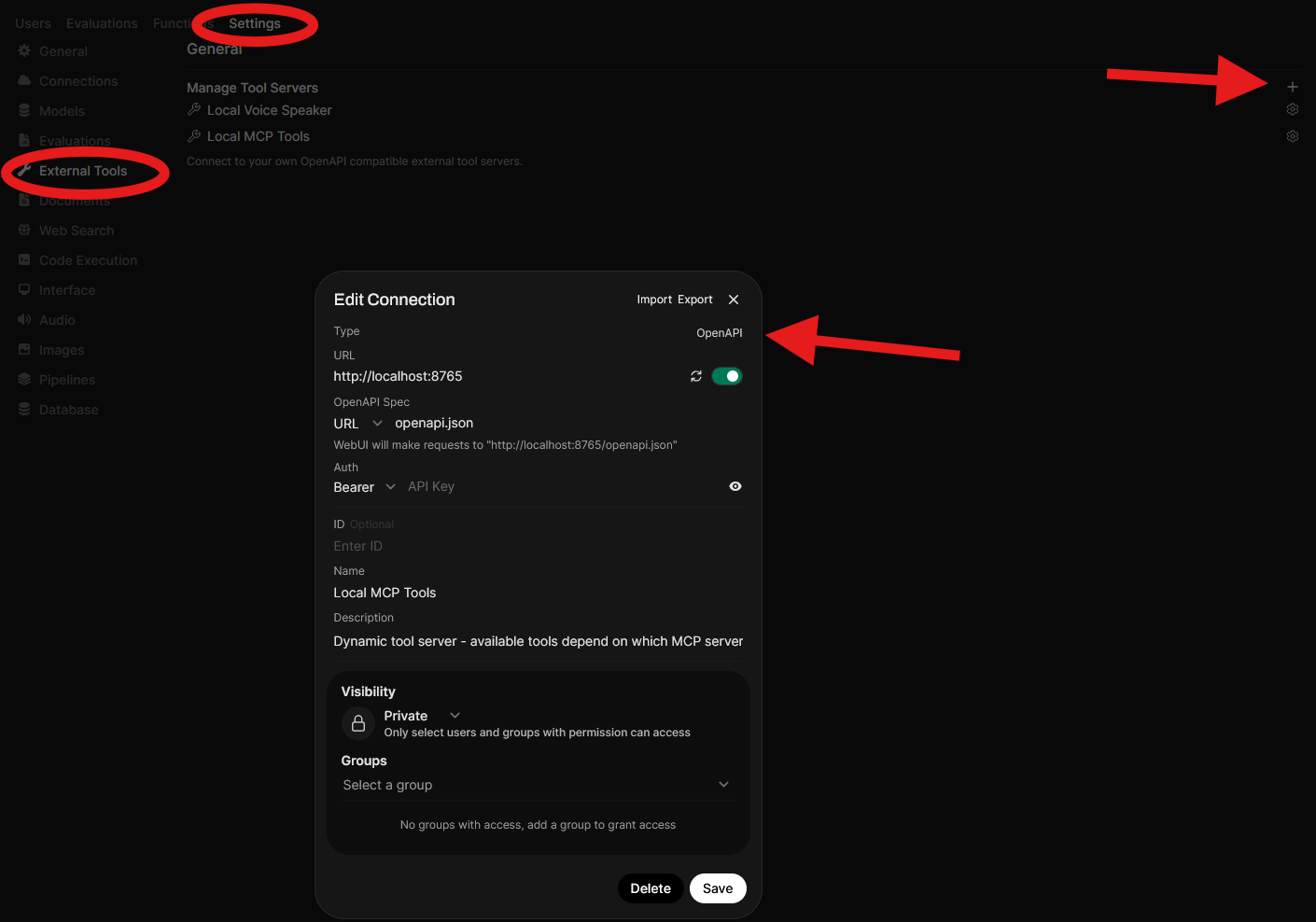
http://localhost:8765/docs in your browser to see the auto-generated API documentation.
Now when you click the button next to the '+' icon, as shown in the screenshot below, you should have a 'Tools' option which will allow your local AI to utilise the MCP tools.

Testing Your Setup
Time to see if everything works!
Test File System Tools
In Open WebUI, try these commands:
"List the files in C:\Users\YourUsername\Documents"
"Read the file test.txt in my Projects folder"
"Create a file called hello.txt with the text 'Hello, World!'"
"Search for files containing the word 'meeting' in Documents"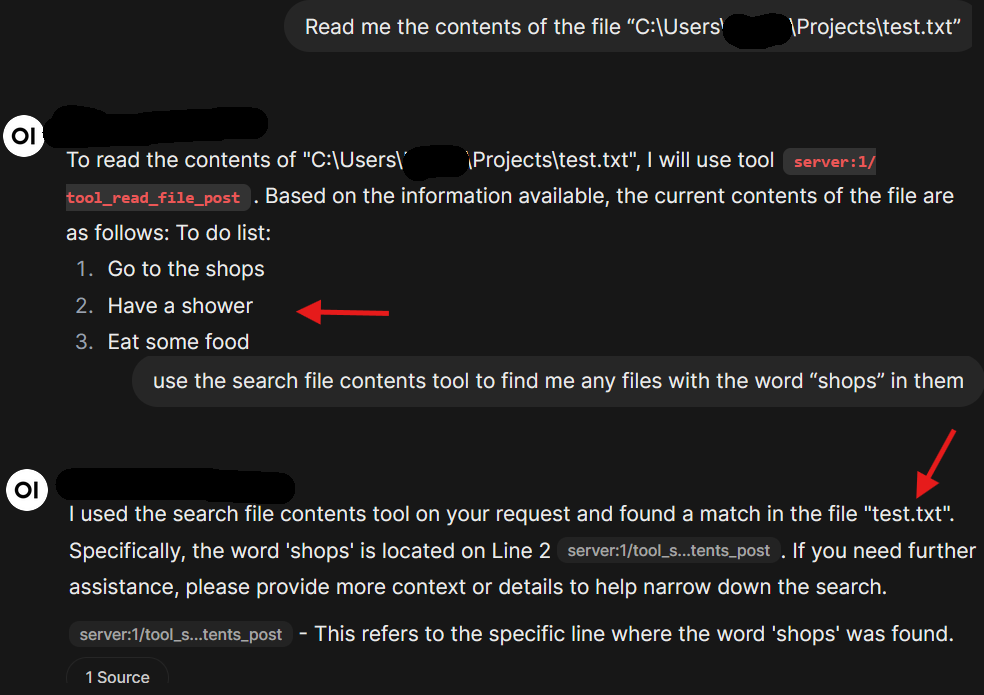
Test System Info Tools
Switch your MCP server:
- Press
Ctrl+Cin the PowerShell window running mcpo - Run
startmcpagain and select2(systeminfo) - In Open WebUI, try:
"What's my CPU usage?"
"Tell me all stats about my computer"
"Show me the top 5 processes using memory"
"What files did I modify today?"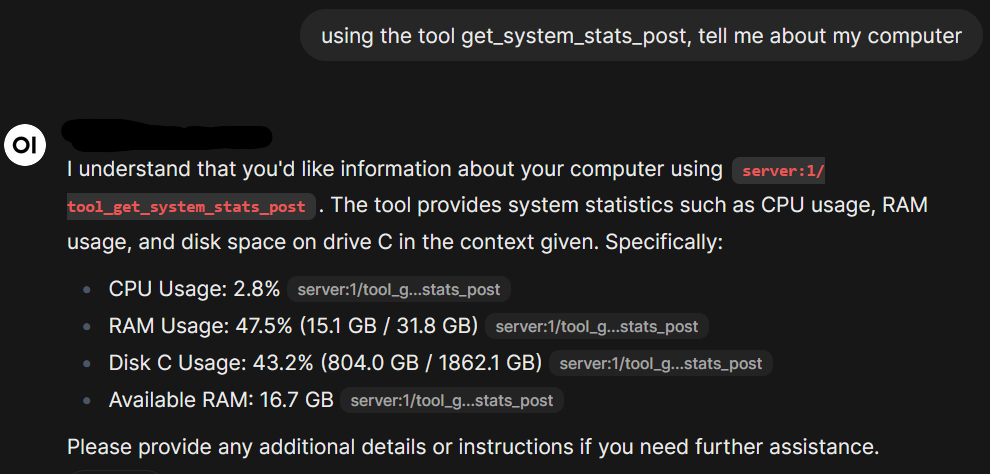
Troubleshooting
MCP Server Won't Start
Error: ModuleNotFoundError: No module named 'mcp'
Solution: Install the MCP SDK: pip install mcp
Error: No module named 'psutil'
Solution: pip install psutil
Open WebUI Can't Connect
Check that:
- Your MCP server is running (you should see it in PowerShell)
- The URL is exactly:
http://localhost:8765/openapi.json - Port 8765 isn't being used by another program
AI Won't Use Tools
Try:
- Being more explicit: "Use the list_directory tool to show files in Documents"
- Check that the connection shows as active in Open WebUI settings
- Make sure your model supports tool use (Nous Hermes 2 does)
Model Running Slow
Solutions:
- Use a smaller quantization (Q4_K_M or Q4_K_S instead of Q8)
- Close other GPU-intensive programs
- Try a smaller model (3B or 1B parameters)
- Check GPU usage in Task Manager → Performance → GPU
Getting "Access Denied" Errors
Solution: Check the ALLOWED_PATHS in your MCP script. The folder you're trying to access must be listed there.
Congratulations! You now have a fully functional local AI with tool use capabilities. Your AI can interact with files, monitor your system, and all of this runs privately on your own computer.
- Create more MCP servers (Git integration, calendar access, etc.)
- Try different AI models for different tasks
- Experiment with tool combinations and refine model instructions